
A visual style guide establishes the design rules, color palettes, and typographic standards that define your digital publication. Establishing these standards early helps solo publishers present a cohesive presence that builds immediate credibility with new readers. Solo creators who document their visual choices produce content faster and avoid the visual clutter that drives potential subscribers away.
The right approach depends on your publishing frequency, the platforms where your brand appears, and the speed at which you plan to expand your digital offerings. Clarifying these visual boundaries transforms a casual hobby site into a recognizable digital media property.
What a Visual Style Guide Means for a Solo Creator
A visual style guide serves as the rulebook for your blog’s visual identity. It gathers every aesthetic decision into a single accessible reference that governs how your website, graphics, and promotional materials look.
Many independent creators assume style manuals belong only to large corporations with sprawling marketing departments. When you run an online venture alone, you act as graphic designer, editor, social media coordinator, and lead writer all at once. Switching between these roles without written guidelines causes decision fatigue and creates disjointed designs across your articles.
Documenting your design parameters eliminates guesswork during your writing sessions. Instead of spending hours wondering which font pair looks appealing or which shade of blue to apply to a button, you make the decision once and follow it across every project. This structured approach preserves your mental energy for creating valuable written content that solves problems for your audience.
A lightweight reference manual is not a creative limitation. It provides an operational system that lets solo publishers output polished digital assets in minutes rather than hours.
Your guide acts as your digital asset manager. Whenever you prepare a social media graphic, an email newsletter banner, or a promotional lead magnet, your documented standards keep your visuals uniform. This consistency trains your audience to spot your publications instantly in a crowded social feed.
Why Visual Consistency Builds Traffic and Reader Trust
Visual consistency transforms casual readers into repeat visitors by signaling care, credibility, and authority. When your website presents a unified appearance across every page, visitors perceive your information as trustworthy and dependable.
Inconsistent styling creates subconscious friction that makes people question the legitimacy of your content. If one blog post features neon buttons with serif body text while the next uses pastel badges and modern sans-serif typography, your platform appears unorganized. Readers naturally associate polished visual organization with intellectual accuracy and high editorial standards.
Standardizing your aesthetic accelerates production while laying the foundation for future business expansion. Documented styles allow you to create reusable design templates, enabling you to publish new articles and promotional graphics at double your current pace. When the time comes to delegate tasks to freelance illustrators or virtual assistants, your guide communicates your vision without endless revisions.
Authority and Credibility
Uniform layouts, consistent typography, and cohesive color schemes make an independent website look like an established, reliable publication.
Rapid Asset Production
Preselected design components eliminate creative hesitation, allowing you to assemble featured banners and social posts rapidly.
Frictionless Scaling
Handing documented rules to virtual assistants or graphic contractors preserves your publication’s visual integrity effortlessly.

GrowthBy10x visual consistency principles applied to everyday blog asset workflows.
Establishing these parameters transforms your personal publishing efforts into an asset that can support multiple revenue streams. Long-term brand equity relies on being instantly recognizable whenever an audience member encounters your work online.
Core Elements Every Blog Visual Style Guide Needs
A comprehensive blog style system covers fundamental design choices without overwhelming you with complex technical jargon. Focusing on essential design rules keeps your documentation practical, easy to update, and immediately usable.
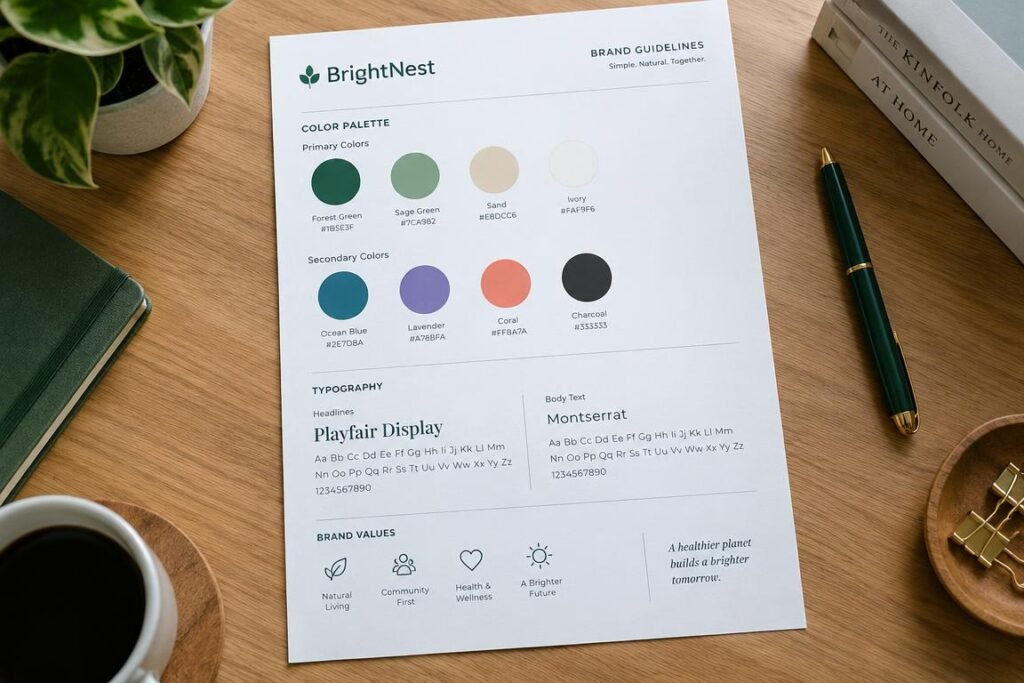
Begin by establishing your primary and accent color palettes. Select a primary color that defines your headers and key brand marks, a neutral tone for your reading canvas, a dark shade for body copy, and a contrasting accent hue reserved exclusively for links and key actions. Limiting your palette to four or five functional shades prevents visual chaos and makes your callouts stand out cleanly.
Typography requires strict hierarchy and high legibility across desktop monitors and mobile screens. Select one primary font for your main headings and a highly legible, clean font for your body text. Document standard font weights, headline sizes, and line-spacing guidelines to maintain readability throughout extensive articles.
- Primary and secondary color palettes defined with exact hex codes for web and digital publication templates.
- Typography hierarchy outlining font families, weights, and letter sizes for headings from top title down to sub-sections.
- Logo and wordmark usage rules outlining minimum clear space, acceptable backgrounds, and forbidden distortions.
- Imagery and photography standards detailing lighting preferences, subject focus, and permitted image filters.
- Iconography and graphic styles specifying stroke widths, container shapes, and decorative element treatments.
- Layout principles covering margin padding, whitespace balance, and standard container widths for text readability.
- Accessibility baselines requiring proper color contrast ratios and scalable text sizes for every reader.
Accessibility must sit at the center of your design planning. High contrast between text and background prevents eye strain, while readable font sizes assist readers using diverse screen resolutions. Prioritizing accessibility expands your audience reach and demonstrates respect for every visitor who lands on your site.
Practical Visual Rules to Document for Daily Publishing
Documenting concrete, practical rules saves solo creators from having to make repetitive stylistic decisions during weekly content production runs. Clear examples of what to do alongside what to avoid keep your publishing output clean and predictable.
Standardize your featured image dimensions and design layout across your content management platform. When all article thumbnails share identical aspect ratios and typography positions, your blog archive displays as a clean, orderly grid. This uniformity prevents broken mobile layouts and misaligned banners across your publishing feed.
Document your button and callout guidelines so interactive elements look consistent across every post. Designate one vibrant accent color strictly for buttons that prompt action, such as downloading a resource or exploring a recommended product. Reserving this specific shade exclusively for interactive prompts trains your readers to identify actionable links across all pages.
| Design Element | Approved Standard | Forbidden Practice | Implementation Guidance |
| Article Headings | Bold Clean Sans | Decorative Script | Keep titles readable across small mobile screens. |
| Body Copy | High-Contrast Slate | Low-Contrast Gray | Maintain strong contrast against clean white backgrounds. |
| Featured Images | Standard Ratio | Random Sizes | Use consistent dimensions to protect site grid layouts. |
| Action Buttons | High-Contrast Coral | Muted Gray Hue | Reserve bright accent colors only for key clicks. |
GrowthBy10x documented publishing guidelines for fast and consistent production.
Extend these rules beyond your blog theme into your email newsletter and social media distributions. When an email subscriber clicks through to read an article on your website, the visual transition should feel natural and seamless. Consistent header styling, matching fonts, and identical button shapes build immediate visual continuity across every touchpoint.
How to Build a Lightweight Style Guide Step by Step
Creating an effective visual identity does not require formal design school training or expensive creative suites. You can assemble a functional, highly effective reference sheet using simple software tools you already understand.
Begin by auditing your current website and collecting your favorite digital assets. Look through your past articles, social graphics, and lead magnets to identify the colors, fonts, and layouts that generated the strongest audience response. Select the elements that reflect your publication’s core purpose and eliminate anything that feels inconsistent or outdated.
- Audit your existing digital assets and catalog the typography, colors, and layouts currently in circulation.
- Select your foundational color palette, recording precise hex codes for primary, dark text, background, and accent tones.
- Establish your typography pairing, choosing one distinct font for titles and one legible font for body reading.
- Design three reusable featured image templates inside a free cloud graphic tool for consistent article headers.
- Document image sourcing rules, outlining subject styling, lighting requirements, and permitted color treatments.
- Consolidate these choices onto a single reference document saved directly to your primary desktop workspace.
Keep your central reference document lightweight and easily accessible. A simple one-page presentation slide or a shared digital notebook page works better than an overwhelming fifty-page manual. The goal is to create a quick reference you can glance at while writing and assembling content for immediate decisions.
Once you document your choices, convert them into pre-built templates in your favorite content and graphic tools. Creating ready-to-use canvas presets for social posts, email headers, and blog thumbnails means you will never face a blank screen when building graphics. Reusable templates lock in your visual identity while slashing your production time.
Recommended Tools and Hardware for Visual Accuracy
Maintaining visual standards across modern devices requires dependable tools that provide accurate color representation. Solo operators can rely on specialized hardware and trusted software platforms to maintain precision across all published media.
Investing in reliable physical color standards and display hardware helps your content look balanced on every reader’s screen. A screen that displays overly warm or saturated colors can cause you to select palettes that look washed out on mobile devices. Calibrating your equipment brings stability to your visual identity across multiple mediums.
Pantone Formula Guide
Physical color swatch decks provide an unmistakable real-world baseline for matching digital hex codes with physical print standards. This prevents color discrepancies across physical merchandise, notebooks, and promotional stationery.
Datacolor SpyderX Pro
A dedicated monitor calibration tool adjusts display output to industry-standard color gamuts. Calibrating your workspace monitor helps you balance contrast, saturation, and brightness accurately before publishing graphics.
On the software side, modern cloud-based layout applications provide built-in team libraries where you can store hex codes, font styles, and brand logos. Storing these assets in a central cloud hub allows you to access your brand elements from any computer or mobile device. This keeps your visual branding unified whether you work from a home office or create graphics while traveling.
Select digital asset tools that allow you to lock template elements in place. Locking logo positions, font sizes, and background borders prevents accidental shifts when swapping out text or photos. These safeguards help solo creators maintain professional standards even when producing graphics under tight deadlines.
Common Objections That Hold Solo Bloggers Back
Independent content creators frequently invent reasons to delay documenting their visual standards. Overcoming these common mental hurdles allows you to build a resilient, recognizable online business right from the beginning.
Many creators argue that their blog is simply too small to warrant an official design manual. Waiting until you attract thousands of daily visitors to organize your design creates massive technical debt. Updating hundreds of published articles to fix inconsistent layouts later takes weeks of tedious work, whereas adopting clear guidelines early establishes good habits from day one.
- Wasting time choosing new fonts and colors for every post.
- Disjointed archives that confuse returning newsletter readers.
- Cluttered mobile layouts that degrade audience trust.
- Frustrating onboarding when hiring freelance production help.
Without a Visual Guide
- Instant asset assembly using pre-made visual templates.
- A clean, memorable aesthetic that builds subscriber loyalty.
- Flawless legibility and accessibility across all screen sizes.
- Frictionless delegation that frees your time for strategic growth.
With a Visual Guide
Another common concern is the fear of being locked into a rigid aesthetic while still experimenting with your brand voice. A visual style system is a living document designed to evolve alongside your business. Documenting your current baseline allows you to make deliberate, purposeful adjustments rather than introducing chaotic, accidental changes across your site.
Solo entrepreneurs also worry that creating brand guidelines requires a dedicated team of art directors. A solo operator needs only a concise reference page containing four colors, two font families, and three graphic templates. This simple setup provides all the structure necessary to look established without adding administrative burdens.
The One-Page Visual Style Guide Launch Checklist
Transforming your publishing workflow requires taking immediate action to lock in your core brand identity. Complete this straightforward launch checklist to build a practical one-page reference for your blog.
Set aside an afternoon to finalize these design selections and record them in your central workspace. Establishing these guidelines once liberates your creative focus for writing high-impact articles that expand your readership and drive online revenue.
- Define one primary brand color and one high-visibility accent color with their six-character hex codes.
- Select one neutral background tone and one dark slate shade for all article body copy.
- Pick two primary font families from an open web directory: one for headings and one for long-form reading.
- Set fixed heading sizes and line heights across your content management system typography settings.
- Establish standard image dimensions for featured article covers, square social posts, and rectangular banner ads.
- Save all primary logo variants and wordmarks as transparent PNG files in a dedicated desktop folder.
- Pin your completed one-page guide above your workspace or bookmark it as your browser startup tab.
Following this checklist gives you an immediate operational advantage over competing blogs that publish haphazard, unorganized layouts. Applying the GrowthBy10x execution mindset to your visual branding positions your site as a leader in your publishing niche.
Frequently Asked Questions
Why does a solo blogger need a visual style guide?
A visual style guide reduces daily decision fatigue by providing clear rules for colors, fonts, and image sizes. It helps one person maintain a professional appearance that builds trust with readers.
How long should a blog visual style guide be?
A lightweight guide should fit on a single page or digital cheat sheet. It only needs to list your hex codes, font pairings, image dimensions, and basic logo rules.
Can I change my visual style guide as my blog grows?
Yes, your guide is a living operational document that should adapt as your content strategy evolves. Updating your reference file helps you make deliberate, controlled improvements across your platform.
Do I need expensive design software to build my style guide?
No, you can create a complete visual manual using free digital notes, cloud documents, or basic presentation slides. The value lies in having clear rules, not in complex software.
How many colors should be included in a blog color palette?
A simple palette works best with four to five functional colors. You need a primary brand color, a dark text tone, a light background shade, and a contrasting accent color for links and buttons.
Building Your GrowthBy10x Visual Asset
Documenting a visual style guide gives your blog the structural discipline required to stand out in a competitive digital landscape. Defining your colors, typography, and templates today speeds up your production schedule and builds lasting credibility with your audience. Open a fresh document, record your foundational design standards, and build a cohesive publication that supports long-term digital growth.